Want to see how accessplanit works in practice?
We're giving you a sneak peek into some of our favourite features, showing how training providers use them to manage everyday processes more efficiently.
This time, we're looking at course transfers. When a learner needs to move to a different course date, accessplanit helps keep bookings, communications and finances connected, without the manual administration that often comes with making changes.
This article will take you through:
-
How our transfer tool works
- What happens in the background
- Keeping payments and invoices aligned
- Preserving the learner experience
- Managing changes at scale
How it works
Step 1: Start the transfer
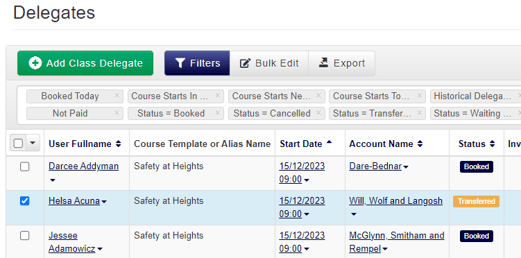
Open the learner's existing booking and launch the transfer process.
Rather than cancelling the booking and creating a new one from scratch, accessplanit guides your team through moving the learner to an alternative course.
Step 2: Select the new course
Choose the new course date the learner would like to attend.
You can review the course details before completing the transfer, ensuring the learner is moved to the correct session.
Step 3: Review any financial changes
If the new course has a different price, or your organisation charges transfer fees, these adjustments can be reviewed during the transfer process.
This helps ensure the learner's new booking reflects the correct pricing before the transfer is completed.
Step 4: Complete the transfer
Once confirmed, accessplanit updates the learner's booking automatically.
Their place on the original course is released, and they're added to the new course.
What happens behind the scenes?
This is where course transfers can become time-consuming when managed manually.
A single transfer often requires updates across learner records, course administration, communications and finance.
With accessplanit, these connected processes can be managed automatically.
Depending on your setup, the platform can:
- Update the learner's booking records
- Release their place on the original course
- Move payments to the new booking
- Apply transfer fees
- Carry forward eligible discounts
- Create and allocate credit notes where required
- Recalculate outstanding balances
- Trigger new course confirmation and joining emails
- Maintain a complete history of the transfer
Instead of updating multiple records across your training management, finance and communications processes, the transfer is handled as a single workflow.
Keeping payments and invoices aligned
One of the biggest challenges with course transfers is managing the financial impact.
If a learner moves to a course with a higher fee, existing payments can be transferred and any outstanding balance identified.
If they move to a lower-cost course, the system can identify overpayments and generate the appropriate financial records to support any refund process.
This gives your finance team a clear audit trail while reducing the amount of manual reconciliation required.
Preserve the learner experience
Course transfers shouldn't create confusion for learners.
Because the transfer is managed within the platform, accessplanit can automatically trigger the relevant communications for the new course, helping ensure learners receive the correct joining instructions and course information.
The result is a smoother experience for both your team and your customers.
Built for training providers managing change at scale
For organisations delivering hundreds or thousands of courses each year, learner transfers are part of everyday operations.
By connecting booking management, communications and finance within a single process, accessplanit helps training providers handle course changes efficiently while maintaining accurate records throughout the learner journey.
Want to learn more about accessplanit?
Book a demo and we’ll walk through the platform, talk through your setup, and answer any questions you have along the way.