Resource management tends to sit quietly in the background of a training business, but it has a knock-on effect on almost everything. If trainers aren’t available, courses can’t run. If venues are overbooked, you’re rearranging sessions. If equipment isn’t where it should be, delivery suffers. Most providers struggle when it becomes difficult to stay on top of as things scale.
More courses, more trainers, more locations… and suddenly you’re juggling availability, schedules, and last-minute changes across multiple places at once.
That’s usually where the cracks start to appear. Not because anything is fundamentally broken, but because the process is relying on too many manual checks and too much internal knowledge. That’s where having everything connected in one system starts to make a real difference.
What does resource management look like day to day?
In simple terms, resource management is about making sure the right people and places are assigned to the right courses, at the right time.
That includes:
- Trainers and assessors
- Venues and rooms
- Equipment or course-specific resources
On a practical level, your team needs to be able to answer a few key questions quickly:
- Who is available for this course?
- Is this venue already in use?
- Are we creating any clashes if we schedule this date?
In reality, those answers aren’t always easy to find.
For many training providers, that information lives in different places. A trainer’s availability might be in a calendar. Venue bookings might be in a spreadsheet. Equipment might be tracked informally or not at all.
So something that should take a few seconds turns into a series of checks, messages, and assumptions.
That’s not just time-consuming, it also introduces risk. It only takes one missed detail for a clash to slip through.
With a training management system, those checks are built into the scheduling process itself, so your team isn’t relying on memory or manual processes to keep everything aligned.
How resource management works in accessplanit
In accessplanit, resources are managed centrally and assigned as part of your course scheduling process.
Everything sits in one place, so your team has a clear, up-to-date view of availability and usage across your entire operation.
Because course scheduling and resource management are connected, you’re not switching between tools or relying on manual checks. It becomes part of the natural workflow, rather than an extra step your team has to remember.
Step 1: manage all resources in one place
Trainers, venues, and equipment are all stored as Resources within accessplanit.
Each resource record can include:
- Working hours and availability
- Unavailability (such as annual leave or other commitments)
- Skills, qualifications, or attributes
- A full history of assigned courses
This creates a single, reliable view of your resources, rather than information being spread across different systems or teams.
It also means anyone scheduling courses is working from the same, consistent data.
For example, if a trainer books annual leave, that’s reflected immediately. There’s no need for someone else to update a separate system or remember not to schedule them.
That consistency is what removes a lot of the small errors that build up over time.
Step 2: assign resources while scheduling courses
When you’re scheduling a course, you assign the required resources directly within the course record.
At that point, accessplanit shows you:
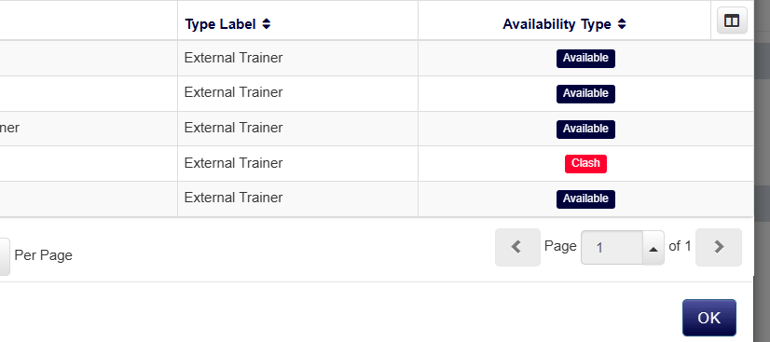
- Which resources are available
- Which resources have conflicts
- Why a conflict exists
So instead of assigning a trainer and finding out later there’s an issue, you can make that decision with full visibility straight away.
This is where a lot of time gets saved in practice.
Rather than assigning first and checking later, or double-checking across multiple systems, everything you need is visible in one place at the point of decision.
It also makes it much easier for different team members to schedule courses confidently, without needing deep knowledge of every trainer or venue.
Step 3: get a true view of availability (especially for sessional courses)
If you run multi-day or sessional courses, you’ll know how easy it is for availability to become misleading.
A common scenario is assigning a trainer or venue to both:
- The overall course (the “head” session)
- The individual sessions within it
Historically, that could block the resource for the entire duration of the course, even if they were only needed for specific sessions.
This often led to situations where resources appeared unavailable when, in reality, they had capacity elsewhere.
The newer option — ‘Check resource availability on child sessions only’ — gives you more control here.
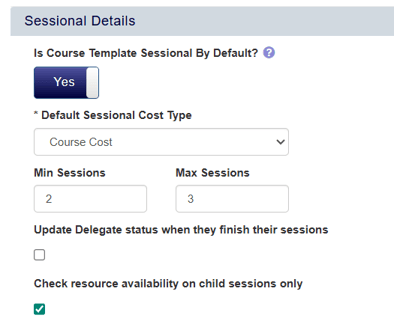
When this is enabled:
- The parent course no longer blocks resource availability
- Only the actual session timings are considered
- Resources are available for other work outside of those sessions
In practice, this means your availability view reflects how resources are actually being used, rather than how the course is structured.
For providers running multiple sessions across different days or locations, this can make a noticeable difference to how efficiently you can schedule.
Step 4: spot clashes instantly
One of the biggest challenges with resource management isn’t assigning resources, it’s spotting when something’s gone wrong.
Without a clear view, clashes often only come to light when someone notices a conflict or when a course is about to run.
accessplanit surfaces this clearly with the Clash Count.
For each course, you can see how many resource conflicts exist, whether that’s:
- A trainer double-booked
- A session outside working hours
- A clash with recorded unavailability
There’s also a clear visual indicator on the course, so your team can spot issues without digging into the detail.
Because this updates dynamically, any changes to schedules or availability are reflected immediately.
So if a trainer’s availability changes or a course is rescheduled, the clash count updates straight away.
That removes the need for manual rechecking and gives your team confidence that what they’re seeing is accurate.
Step 5: stay ahead of issues, not just react to them
The real value comes from how you use that information.
Instead of finding out about clashes when a trainer can’t attend, you can identify them earlier in the process.
For example, you can:
- Build dashboards showing all courses with clashes
- Run reports to identify recurring scheduling issues
- Trigger automated alerts when a clash occurs
This gives you a much clearer view of where pressure points exist in your schedule.
You might notice certain trainers are consistently overbooked, or that specific time slots are causing repeated issues.
With that insight, you can adjust your planning rather than just fixing problems as they arise.
What difference does this make?
When resource management is handled within your scheduling process, the impact is felt across your whole operation.
Your team spends less time checking availability manually or fixing avoidable issues.
Courses are scheduled with more confidence, because decisions are based on real-time data rather than assumptions or fragmented information.
You reduce last-minute changes, which improves both internal efficiency and the experience for your learners.
It also becomes much easier to scale.
As your course volume increases, you’re not adding complexity at the same rate, because the system is doing a lot of the heavy lifting in the background.
And importantly, you make better use of the resources you already have, whether that’s trainers, venues, or equipment.
Bringing it all together
Resource management is an integral part of how your entire operation runs.
When it’s handled manually, it can become a constant source of friction, with small issues building up over time.
By connecting resource availability, course scheduling, and clash detection in one place, accessplanit makes it easier to stay in control as your course volume grows.
So instead of constantly checking, fixing, and rearranging, your team can focus on planning ahead and delivering training with confidence.
Want to learn more about accessplanit?
Book a demo and we’ll walk through the platform, talk through your setup, and answer any questions you have along the way.
%20in%202025..png?width=270&height=170&name=How%20to%20choose%20the%20right%20training%20management%20software%20(TMS)%20in%202025..png)
.png?width=270&height=170&name=choosing%20training%20methodology%20(1).png)